Getting started with the iBizify Client Portal
The iBizify Client Portal is a secure place online where you can manage and access your iBizify services, raise requests, view reports, manage your cloud services, remote devices and more.
You access the Client Portal via the web. While it is possible to access via mobile, we recommend using your day-to-day PC or Mac. If you regularly travel, consider activating the portal on the device you would take with you.
The security mechanism of the Client Portal requires a modern device on a supported operating system: Windows 11 PC, or a Mac running one of the three most recent major macOS versions with TouchID support. Nearly all recent Android or Apple iPhone devices will be supported.
Logging in for the first time
You will receive and email with your username - usually firstname.lastname@portal.ibizify.net, along with a limited time signup link.
Your signup link is only valid for a brief period, if it expires before you use it, simply reply to request another link.
Click on the provided link. If you use multiple web browsers, copy and paste the link into the browser that you will use to access this service.
You will land at this screen:
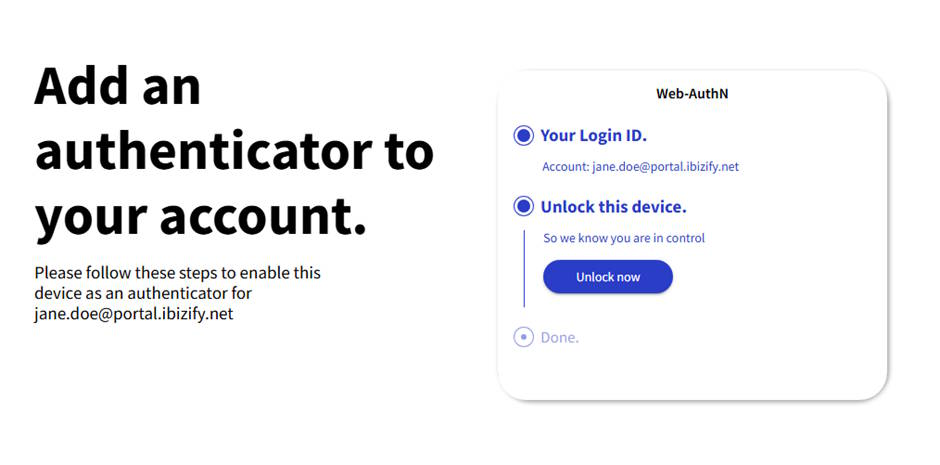
Click Unlock now, then follow the prompts to confirm authorising your device by entering your computer's security detail, such as your computer password, PIN number, or biometrics (such as fingerprint)
A passkey is then stored in your device for future use.
Success 🎉 Your device is now authorised to sign in to the Client Portal
Logging in thereafter
Visit the Client Portal by going to:
We recommend you bookmark/favourite this link for rapid future access.
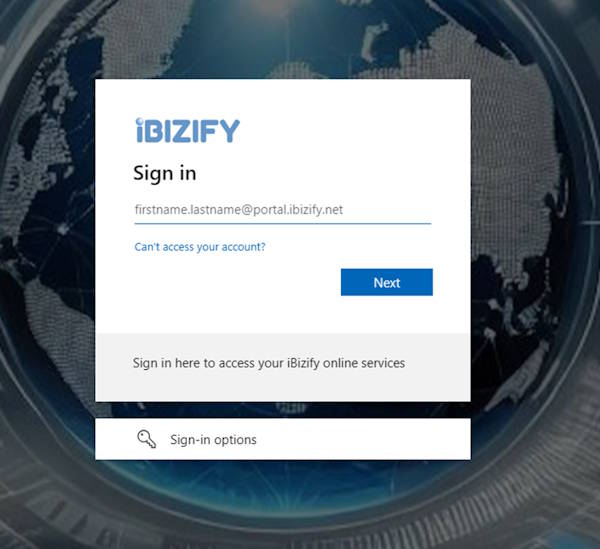
Enter your username - usually firstname.lastname@portal.ibizify.net, then click Next.
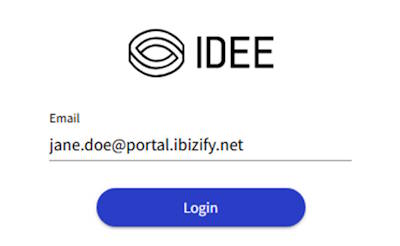
Click Login
Follow the prompts to unlock your device with your PIN, or biometrics (such as fingerprint).
Success 🎉 You are into the iBizify Client Portal
If you ever need to register a different device, or have access on multiple devices, please submit a Standard Support request from within the Portal.
If you cannot access the portal, please email support@ibizify.net.